GM盒子(高返利版)
GM手游福利平台,免费送首充,上线送VIP,免费领元宝和代金券。
在网页中,辛辛苦苦写的文章,被别人复制粘贴给盗用去另很多站长感到非常无奈,通常大家复制都会使用选取
右键复制,或CTRL+C等方式,下面介绍几种禁止
鼠标右键代码,可减少网页上文章被抄袭的几率,当然对高手来说,破解也很简单,不管怎么样,我们还是一起试试吧。
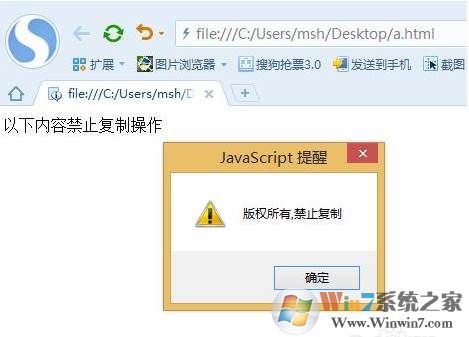
使用方法:以下代码加入到
oncontextmenu事件禁用右键菜单代码;
js代码:
document.oncontextmenu = function(){ event.returnValue = false;}// 或者直接返回整个事件document.oncontextmenu = function(){ return false;}onselectstart事件禁用网页上选取的内容;
js代码:
document.onselectstart = function(){ event.returnValue = false;}// 或者直接返回整个事件document.onselectstart = function(){ return false;}oncopy事件禁用复制;
js代码:
document.oncopy = function(){ event.returnValue = false;}// 或者直接返回整个事件document.oncopy = function(){ return false;}以上三种事件,如果只想单纯的禁用鼠标右键,和复制粘贴,还可以将它们直接写到HTML中的body上面;
禁用鼠标事件
document.onmousedown = function(e){ if ( e.which == 2 ){// 鼠标滚轮的按下,滚动不触发 return false; } if( e.which==3 ){// 鼠标右键 return false; }}禁用键盘中的ctrl、alt、shift
document.onkeydown = function(){ if( event.ctrlKey ){ return false; } if ( event.altKey ){ return false; } if ( event.shiftKey ){ return false; }}关键就在 oncontextmenu='return false'
ondragstart='return false'
onselectstart ='return false'
onselect='document.selection.empty()'
oncopy='document.selection.empty()'
onbeforecopy='return false'
onmouseup='document.selection.empty()'
一个更简单的方法就是在中加入如下的代码,这样鼠标的左右键都失效了. topmargin="0" oncontextmenu="return false" ondragstart="return false" onselectstart ="return false" onselect="document.selection.empty()" oncopy="document.selection.empty()" onbeforecopy="return false" onmouseup="document.selection.empty()" 1.禁止网页另存为:在后面加入以下代码: 2.禁止网页内容复制.粘贴:在中加入以下代码:
在网站的建设中,文章内容通过技术手段禁止复制只能说是一个辅助作用,保护原创才是正解,目前百度推出了原创保护功能,大家可以去试试哦。